Experiments
Experiments perform the data acquisition and send the data to consumers. They
consist of Acquisition objects which connect data producers with
consumers for a particular experiment part (dark fields, projections, …). This
way the experiments can be divided into smaller logical pieces. Data consumers
are implemented by various Addon classes (e.g. image writing, live
view, …), which can be attached to or detached from experiments dynamically.
Data handling can be realized locally or remotely. Local data handling keeps all data in your concert session, which may lead to performance decrease. Remote data handling means that the producer lives on a separate computer and all addons as well and concert merely organizes the data links by ZMQ and the synchronization of the data acquisition. This is the preferred way because it lifts the burden of data processing from your concert session. Below you can find examples for local and remote experiments. Schematically, the data and control links of the latter are:
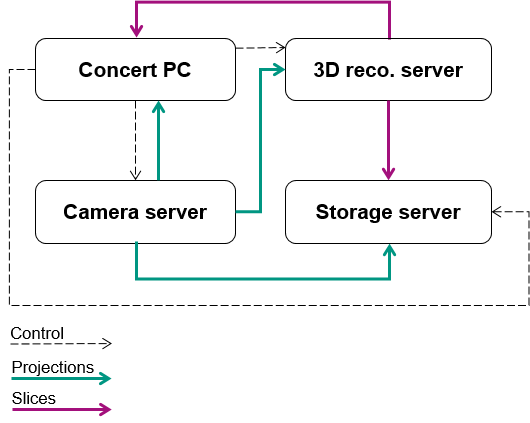
Running an experiment
Experiment makes sure all acquisitions are executed and all
producers are connected to all consumers. To demonstrate how a typical
experiment can be run in an empty session with dummy devices:
from concert.storage import DirectoryWalker
from concert.ext.viewers import PyplotImageViewer
from concert.experiments.addons import local as local_addons
from concert.devices.motors.dummy import LinearMotor, ContinuousRotationMotor
from concert.devices.cameras.dummy import Camera
from concert.devices.shutters.dummy import Shutter

# Import experiment
from concert.experiments.synchrotron import LocalContinuousTomography

# Devices
camera = await Camera()
shutter = await Shutter()
flat_motor = await LinearMotor()
tomo_motor = await ContinuousRotationMotor()

viewer = await PyplotImageViewer()
walker = await DirectoryWalker()
exp = await LocalContinuousTomography(
    walker=walker,
    flat_motor=flat_motor,
    tomography_motor=tomo_motor,
    radio_position=0*q.mm,
    flat_position=10*q.mm,
    camera=camera,
    shutter=shutter
)

# Attach live_view to the experiment
live = await local_addons.LiveView(viewer, exp)

# Attach image writer to experiment
writer = await local_addons.ImageWriter(exp)

# Run the experiment
f = exp.run()

# Wait until the experiment is done
await f
Experiments also have a base.Experiment.log attribute, which gets a
new handler on every experiment run and this handler stores the output in the
current experiment working directory defined by it’s
concert.storage.DirectoryWalker.
Local dummy file experiment
The following session illustrates how to use an
ImagingFileExperiment together with
LiveView,
ImageWriter and
OnlineReconstruction addons:
import numpy as np
import logging
import concert
concert.require("0.33.0")

from concert.devices.cameras.dummy import FileCamera
from concert.devices.shutters.dummy import Shutter
from concert.devices.motors.dummy import ContinuousRotationMotor, ContinuousLinearMotor
from concert.quantities import q
from concert.experiments.addons import local as local_addons
from concert.experiments.dummy import ImagingFileExperiment
from concert.storage import DirectoryWalker
from concert.ext.viewers import PyQtGraphViewer, PyplotImageViewer
from concert.ext.ufo import GeneralBackprojectArgs, GeneralBackprojectManager


concert.config.PROGRESS_BAR = False
LOG = logging.getLogger(__name__)


viewer = await PyQtGraphViewer(show_refresh_rate=True)
slice_viewer = await PyQtGraphViewer(show_refresh_rate=True, title="Slices")

num_radios = 3000

walker = await DirectoryWalker(
    root='/mnt/fast/tests',
    bytes_per_file=2 ** 40,
)
flat_motor = await ContinuousLinearMotor()
rot_motor = await ContinuousRotationMotor()
shutter = await Shutter()
vert_motor = await ContinuousLinearMotor()

camera = await FileCamera("/mnt/fast/CT42/radios/*.tif")
await camera.set_roi_y0(800 * q.px)
await camera.set_roi_height(200 * q.px)
# Imaging file dummy experiment
ex = await ImagingFileExperiment(
    camera,
    100,
    100,
    num_radios,
    darks_pattern='/mnt/fast/CT42/darks',
    flats_pattern='/mnt/fast/CT42/flats',
    radios_pattern='/mnt/fast/CT42/radios',
    walker=walker,
)

# Live view
live = await local_addons.LiveView(viewer, ex)

# Writer
writer = await local_addons.ImageWriter(ex)

# Online Reco
reco = await local_addons.OnlineReconstruction(
    ex,
    do_normalization=True,
    average_normalization=True,
    slice_directory="online-slices",
    viewer=slice_viewer
)
await reco.set_region([0., 1., 1.])
await reco.set_center_position_x([1009.0] * q.px)
await reco.set_fix_nan_and_inf(True)
await reco.set_absorptivity(True)
await reco.set_center_position_z([0.5] * q.px)
await reco.set_number(num_radios)
await reco.set_overall_angle(np.pi * q.rad)
Remote dummy file experiment
The following session illustrates the remote version of the experiment above.
Cameras in concert can send images over network, so we can just use the file
camera here as well. The following session uses a
RemoteFileImagingExperiment together with
LiveView,
ImageWriter and
OnlineReconstruction addons:
import logging
import numpy as np
import os
import zmq
import concert
import time
concert.require("0.33.0")

from concert.devices.cameras.dummy import FileCamera
from concert.helpers import CommData
from concert.quantities import q
from concert.networking.base import get_tango_device
from concert.experiments.addons import tango as tango_addons
from concert.experiments.dummy import RemoteFileImagingExperiment
from concert.storage import RemoteDirectoryWalker
from concert.ext.viewers import PyQtGraphViewer
from concert.experiments.addons.tango import (
    ImageWriter as TangoRemoteWriter,
    OnlineReconstruction as TangoOnlineReconstruction,
    LiveView as TangoLiveView
)


concert.config.PROGRESS_BAR = False
LOG = logging.getLogger(__name__)
viewer = await PyQtGraphViewer(show_refresh_rate=True)
slice_viewer = await PyQtGraphViewer(show_refresh_rate=True, title="Slices")
num_radios = 3000

SERVERS = {
        "writer": CommData("localhost", port=8992, socket_type=zmq.PUSH),
        "reco": CommData("localhost", port=8993, socket_type=zmq.PUSH),
        "live": CommData("localhost", port=8995, socket_type=zmq.PUB, sndhwm=1),
}

walker_device = get_tango_device(
    f'{os.uname()[1]}:1238/concert/tango/walker#dbase=no', timeout=1000 * q.s
)
walker = await RemoteDirectoryWalker(
    device=walker_device,
    root='/mnt/fast/tests',
    bytes_per_file=2 ** 40,
)

camera = await FileCamera("/mnt/fast/CT42/radios/*.tif")
await camera.set_roi_y0(800 * q.px)
await camera.set_roi_height(200 * q.px)
ex = await RemoteFileImagingExperiment(
    camera,
    100,
    100,
    num_radios,
    darks_pattern='/mnt/fast/CT42/darks',
    flats_pattern='/mnt/fast/CT42/flats',
    radios_pattern='/mnt/fast/CT42/radios',
    walker=walker,
)

# Live View
if "live" in SERVERS:
    live = await TangoLiveView(viewer, SERVERS["live"], ex)

# Writer
writer = await tango_addons.ImageWriter(ex, SERVERS["writer"])

# Online Reco
if "reco" in SERVERS:
    reco_device = get_tango_device(f'{os.uname()[1]}:1237/concert/tango/reco#dbase=no', timeout=1000 * q.s)
    # await reco_device.write_attribute('endpoint', SERVERS["reco"].client_endpoint)
    reco = await tango_addons.OnlineReconstruction(
        reco_device,
        ex,
        SERVERS["reco"],
        do_normalization=True,
        average_normalization=True,
        slice_directory="online-slices",
        viewer=slice_viewer
    )
    await reco.set_region([0., 1., 1.])
    await reco.set_center_position_x([1009.0] * q.px)
    await reco.set_fix_nan_and_inf(True)
    await reco.set_absorptivity(True)
    await reco.set_center_position_z([0.5] * q.px)
    await reco.set_number(num_radios)
    await reco.set_overall_angle(np.pi * q.rad)
    # Online reco uses its own separate walker for writing
    await reco_device.setup_walker(
        [
            f'{os.uname()[1]}:2238/concert/tango/walker#dbase=no',
            '/mnt/fast/tests',
            "tcp", "localhost", "8996"
        ]
    )
The experiment above needs tango servers for the respective addons to be started, which can be done by:
concert tango reco --port 1237
concert tango walker --port 1238
concert tango walker --port 2238
Addons
Addons typically provide consumers for different kinds of acquisitions in an experiment. E.g., online 3D reconstruction will average the dark fields and flat fields and trigger the reconstruction in the acquisition taking the projections. Addons attach themselves to experiment acquisitions upon creation and can be later detached from them. They can be local or remote, depending on where the data comes from. For example, to save images on disk locally:
from concert.experiments.addons.local import ImageWriter

# Let's assume an experiment is already defined
writer = ImageWriter(experiment)
# Now images are written on disk
await experiment.run()
# Do not write images anymore
await writer.detach()
Experiment base module
An experiment can be run multiple times. The base Experiment takes
care of proper logging structure.
- class concert.experiments.base.Acquisition(self, name, producer_corofunc, producer=None, acquire=None)
An acquisition acquires data, gets it and sends it to consumers. This is a base class for local and remote acquisitions and must not be used directly.
- name
name of this acquisition
- producer_corofunc
a callable with no arguments which returns a generator yielding data items once called.
- producer
- data producer (usually a :class:`~concert.devices.cameras.base.Camera` class), must be
- specified for remote acquisitions.
- acquire
a coroutine function which acquires the data, takes no arguments, can be None.
- add_consumer(consumer)
Add consumer, remote must match this acquisition mode.
- remove_consumer(consumer)
Remove addon’s consumer.
- exception concert.experiments.base.AcquisitionError
Acquisition-related exceptions.
- class concert.experiments.base.Consumer(corofunc, corofunc_args=(), corofunc_kwargs=None, addon=None)
A wrapper for turning coroutine functions into coroutines.
- Parameters
corofunc – a consumer coroutine function
corofunc_args – a list or tuple of corofunc arguemnts
corofunc_kwargs – a list or tuple of corofunc keyword arguemnts
addon – a
Addonobject
- exception concert.experiments.base.ConsumerError
Consumer-related exceptions.
- class concert.experiments.base.Experiment(self, acquisitions, walker=None, separate_scans=True, name_fmt='scan_{:>04}')
Experiment base class. An experiment can be run multiple times with the output data and log stored on disk. You can prepare every run by
prepare()and finish the run byfinish(). These methods do nothing by default. They can be useful e.g. if you need to reinitialize some experiment parts or want to attach some logging output.- acquisitions
A list of acquisitions this experiment is composed of
- walker
A
concert.storage.Walkerdescends to a data set specific for every run if given
- separate_scans
If True, walker does not descend to data sets based on specific runs
- name_fmt
Since experiment can be run multiple times each iteration will have a separate entry on the disk. The entry consists of a name and a number of the current iteration, so the parameter is a formattable string.
- ready_to_prepare_next_sample
asyncio.Event that can be used to tell a processes.experiment.Director that the next iteration can be prepared. Can be set() to allow the preparation while the experiment is still running.
- await acquire()
Acquire data by running the acquisitions. This is the method which implements the data acquisition and should be overwritten if more functionality is required, unlike
run().
- property acquisitions
Acquisitions is a read-only attribute which has to be manipulated by explicit methods provided by this class.
- add(acquisition)
Add acquisition to the acquisition list and make it accessible as an attribute:
frames = Acquisition(...)
experiment.add(frames)
# This is possible
experiment.frames
- add_device_to_log(name: str, device: Device, optional=False)
Add a device to log.
- Parameters
name – Name of the device
device – Device to log
optional – If True, an exception when trying to log the device will not cause an error.
- await attach(addon)
Attach addon to all acquisitions.
- await detach(addon)
Detach addon from all acquisitions.
- await finish()
Gets executed after every experiment run.
- get_acquisition(name)
Get acquisition by its name. In case there are more like it, the first one is returned.
- await get_running_acquisition()
Get the currently running acquisition.
- await prepare()
Gets executed before every experiment run.
- remove(acquisition)
Remove acquisition from experiment.
- swap(first, second)
Swap acquisition first with second. If there are more occurrences of either of them then the ones which are found first in the acquisitions list are swapped.
- exception concert.experiments.base.ExperimentError
Experiment-related exceptions.
- concert.experiments.base.local(corofunc)
Decorator which marks corofunc as local. If corofunc is an async generator function, then it must yield values itself, it cannot just return a generator, otherwise it would not be recognized by inspect.isasyncgenfunction.
- concert.experiments.base.remote(corofunc)
Decorator which marks corofunc as remote.
Dummy experiments
Dummy experiments.
- class concert.experiments.dummy.ImagingExperiment(self, num_darks, num_flats, num_radios, camera=None, shape=(1024, 1024), walker=None, random=False, dtype=<class 'numpy.uint16'>, separate_scans=True, name_fmt='scan_{:>04}')
A typical imaging experiment which consists of acquiring dark, flat and radiographic images, in this case zeros or random data.
- num_darks
Number of dark images (no beam, just dark current)
- num_flats
Number of flat images (beam present, sample not)
- num_radios
Number of radiographic images
- camera
Camera to use for generating images
- shape
Shape of the generated images (H x W) (default: 1024 x 1024) if camera is not specified
- random
‘off’: use zeros ‘single’: one random repeated in every iteration ‘multi’: every iteration generates new random image
- dtype
Data type of the generated images (default: unsigned short)
- class concert.experiments.dummy.ImagingFileExperiment(self, camera, num_darks, num_flats, num_radios, darks_pattern='darks', flats_pattern='flats', radios_pattern='projections', walker=None, separate_scans=True, name_fmt='scan_{:>04}')
A typical imaging experiment which consists of acquiring dark, flat and radiographic images, in this case located on a disk.
- camera
A
FileCameraobject
- num_darks
Number of dark images (no beam, just dark current)
- num_flats
Number of flat images (beam present, sample not)
- num_radios
Number of radiographic images
- darks_pattern
Dark images file name pattern
- flats_pattern
Flat images file name pattern
- radios_pattern
Projection images file name pattern
- class concert.experiments.dummy.RemoteFileImagingExperiment(self, camera, num_darks, num_flats, num_radios, darks_pattern='darks', flats_pattern='flats', radios_pattern='projections', walker=None, separate_scans=True, name_fmt='scan_{:>04}')
Uses a client camera and instead of yielding frames just tells the remote file camera to send them via network.
- camera
A
FileCameraobject
- num_darks
Number of dark images (no beam, just dark current)
- num_flats
Number of flat images (beam present, sample not)
- num_radios
Number of radiographic images
- darks_pattern
Dark images file name pattern
- flats_pattern
Flat images file name pattern
- radios_pattern
Projection images file name pattern
Addon classes
Add-ons for acquisitions are standalone extensions which can be applied to them. They operate on the acquired data, e.g. write images to disk, do tomographic reconstruction etc.
- class concert.experiments.addons.base.Accumulator(self, experiment, acquisitions=None, shapes=None, dtype=None)
An addon which accumulates data.
- acquisitions
a list of
Acquisitionobjects- shapes
a list of shapes for different acquisitions
- dtype
the numpy data type
- class concert.experiments.addons.base.Addon(self, experiment, acquisitions=None)
A base addon class. An addon can be attached, i.e. its functionality is applied to the specified acquisitions and detached.
- acquisitions
A list of
_Acquisitionobjects. The addon attaches itself on construction.- await attach(acquisitions)
Attach the addon to acquisitions.
- await detach(acquisitions)
Detach the addon from acquisitions.
- exception concert.experiments.addons.base.AddonError
Addon errors.
- class concert.experiments.addons.base.Benchmarker(self, experiment, acquisitions=None)
An addon which counts the time of acquisition duration.
- acquisitions
a list of
Acquisitionobjects
- class concert.experiments.addons.base.Consumer(self, consumer, experiment, acquisitions=None)
An addon which applies a specific coroutine-based consumer to acquisitions.
- acquisitions
a list of
Acquisitionobjects
- class concert.experiments.addons.base.ImageWriter(self, experiment, acquisitions=None)
An addon which writes images to disk.
- acquisitions
a list of
Acquisitionobjects- walker
A
Walkerinstance- write_sequence(name, producer=None)
Organize image writing to subdirectory name and return a coroutine which does the actual writing. This function is called inside the context manager of the walker and thus guarantees the correct base path of the experiment but also `async with self.walker’ is not allowed here because it would block.
- class concert.experiments.addons.base.LiveView(self, viewer, experiment, acquisitions=None)
An addon which applies a specific coroutine-based consumer to acquisitions.
- acquisitions
a list of
Acquisitionobjects
- class concert.experiments.addons.base.OnlineReconstruction(self, proxy, experiment, acquisitions=None, do_normalization=True, average_normalization=True, slice_directory='online-slices', viewer=None)
- await find_axis(region, z=None, store=False)
Find tomographic rotation axis.
- abstractmethod await find_parameter(parameter, region, metric='sag', z=None, store=False)
Find optimal parameter value in the region as [from, to, step] based on metric at height z and return it. If store is True, save the found value.
- await rereconstruct(slice_directory=None)
Rereconstruct cached projections and saved them to slice_directory, which is a full path.
- exception concert.experiments.addons.base.OnlineReconstructionError
- class concert.experiments.addons.base.PhaseGratingSteppingFourierProcessing(self, experiment, output_directory='contrasts')
Addon for a grating interferometry stepping experiment to process the raw data. The order of the acquisitions can be changed.
- concert.experiments.addons.base.get_acq_by_name(acquisitions, name)
Get acquisition by name from a list of acquisitions.
- class concert.experiments.addons.local.Accumulator(self, experiment, acquisitions=None, shapes=None, dtype=None)
- class concert.experiments.addons.local.Benchmarker(self, experiment, acquisitions=None)
- class concert.experiments.addons.local.Consumer(self, consumer, experiment, acquisitions=None)
- class concert.experiments.addons.local.ImageWriter(self, experiment, acquisitions=None)
- await write_sequence(name, producer=None)
Wrap the walker and write data to subdirectory name.
- class concert.experiments.addons.local.LiveView(self, viewer, experiment, acquisitions=None)
- class concert.experiments.addons.local.OnlineReconstruction(self, experiment, acquisitions=None, do_normalization=True, average_normalization=True, slice_directory='online-slices', viewer=None)
- await find_parameter(parameter, region, metric='sag', z=None, store=False)
Find optimal parameter value in the region as [from, to, step] based on metric at height z and return it. If store is True, save the found value.
- class concert.experiments.addons.local.PCOTimestampCheck(self, experiment, acquisitions=None)
- exception concert.experiments.addons.local.PCOTimestampCheckError
- class concert.experiments.addons.local.PhaseGratingSteppingFourierProcessing(self, experiment, output_directory='contrasts')
- await process_darks(producer)
Processes dark images. All dark images are averaged.
- Parameters
producer – Dark image producer
- Returns
- class concert.experiments.addons.tango.Benchmarker(self, experiment, device, endpoint, acquisitions=None)
- class concert.experiments.addons.tango.ImageWriter(self, experiment, endpoint, acquisitions=None)
- await write_sequence(name)
Organize image writing to subdirectory name and return a coroutine which does the actual writing. This function is called inside the context manager of the walker and thus guarantees the correct base path of the experiment but also `async with self.walker’ is not allowed here because it would block.
- class concert.experiments.addons.tango.LiveView(self, viewer, endpoint, experiment, acquisitions=None)
- class concert.experiments.addons.tango.OnlineReconstruction(self, device, experiment, endpoint, acquisitions=None, do_normalization=True, average_normalization=True, slice_directory='online-slices', viewer=None)
- await find_parameter(parameter, region, metric='sag', z=None, store=False)
Find optimal parameter value in the region as [from, to, step] based on metric at height z and return it. If store is True, save the found value.
- class concert.experiments.addons.tango.TangoMixin
TangoMixin does not need a producer becuase the backend processes image streams which do not come via concert.
Advanced
Sometimes we need finer control over when exactly is the data acquired and worry about the download later. We can use the acquire argument to acquisition class. This means that the data acquisition can be invoked before data download. Acquisition calls its acquire first and only when it is finished connects producer with consumers.
The Experiment class has the attribute
base.Experiment.ready_to_prepare_next_sample which is an instance of
an asyncio.Event. This can be used to tell that most of the experiment
is finished and a new iteration of this experiment can be prepared (e.g. by the
concert.directors.base.Director. In the base.Experiment.run()
the base.Experiment.ready_to_prepare_next_sample will be set that at
the end of an experiment is is always set. In the beginning of the
base.Experiment.run() it will be cleared. This is an example
implementation making use of this:
from concert.experiments.base import Experiment, Acquisition
class MyExperiment(Experiment):
        async def __ainit__(self, walker, camera):
                acq = Acquisition("acquisition", self._produce_frames)
                self._camera = camera
                await super().__ainit__([acq], walker)

        async def _produce_frame(self):
                num_frames = 100
                async with self._camera.recording():
                        # Do the acquisition of the frames in camera memory

                # Only the readout and nothing else will happen after this point.
                self.ready_to_prepare_next_sample.set()

                async with self._camera.readout():
                        for i in range(num_frames):
                                yield await self._camera.grab()
Imaging experiments
A basic frame acquisition generator which triggers the camera itself is provided by
frames()
- async for ... in concert.experiments.imaging.frames(num_frames, camera, callback=None)
A generator which takes num_frames using camera. callback is called after every taken frame.
There are tomography helper functions which make it easier to define the proper settings for conducting a tomographic experiment.
- concert.experiments.imaging.tomo_angular_step(frame_width)
Get the angular step required for tomography so that every pixel of the frame rotates no more than one pixel per rotation step. frame_width is frame size in the direction perpendicular to the axis of rotation.
- concert.experiments.imaging.tomo_projections_number(frame_width)
Get the minimum number of projections required by a tomographic scan in order to provide enough data points for every distance from the axis of rotation. The minimum angular step is considered to be needed smaller than one pixel in the direction perpendicular to the axis of rotation. The number of pixels in this direction is given by frame_width.
- concert.experiments.imaging.tomo_max_speed(frame_width, frame_rate)
Get the maximum rotation speed which introduces motion blur less than one pixel. frame_width is the width of the frame in the direction perpendicular to the rotation and frame_rate defines the time required for recording one frame.
_Note:_ frame rate is required instead of exposure time because the exposure time is usually shorter due to the camera chip readout time. We need to make sure that by the next exposure the sample hasn’t moved more than one pixel from the previous frame, thus we need to take into account the whole frame taking procedure (exposure + readout).
Synchrotron and X-Ray tube experiments
In concert.experiments.synchrotron and concert.experiments.xraytube experiment classes for
Radiography, SteppedTomography, ContinuousTomography and SteppedSpiralTomography,
ContinuousSpiralTomography and GratingInterferometryStepping are implemented for
the two different source types as local and remote experiments.
For detailed information how they are implemented, you can have a look at the
base classes Radiography,
Tomography,
SteppedTomography,
ContinuousTomography,
SteppedSpiralTomography,
ContinuousSpiralTomography and
GratingInterferometryStepping.
In the standard configuration, all tomography and radiography experiments first
acquire the dark images, then the flat images and the projection images of the
sample at the end. This order can be adjusted by the
swap() command.
You can find more details on the different experiments in Experiment implementations.
Control
Experiment automation based on on-line data analysis.
- class concert.experiments.control.ClosedLoop
An abstract feedback loop which acquires data, analyzes it on-line and provides feedback to the experiment. The data acquisition procedure is done iteratively until the result of some metric converges to a satisfactory value. Schematically, the class is doing the following in an iterative way:
initialize -> measure -> compare -> OK -> success
                ^            |
                |           NOK
                |            |
                -- control <--
- abstractmethod await compare()
Return True if the metric is satisfied, False otherwise. This is the decision making process.
- await control()
React on the result of a measurement.
- await initialize()
Bring the experimental setup to some defined initial (reference) state.
- await measure()
Conduct a measurement from data acquisition to analysis.
- await run(self, max_iterations=10)
Run the loop until the metric is satisfied, if we don’t converge in max_iterations then the run is considered unsuccessful and False is returned, otherwise True.